Screen Time Limits by Age
Research-based guidelines for healthy screen use. Build digital habits that support your child's development.
Try Our Screen Time CalculatorScreen Time Management Tools
Understanding Screen Time Guidelines
Screen time limits aren't about demonizing technology - they're about ensuring kids have balanced lives. The research is clear: too much screen time can affect sleep, physical activity, and social development. But quality matters as much as quantity.
Quantity
How much time on screens
Quality
What they're watching/doing
Context
Solo vs. with family
The Key Principle
Screen time should never displace sleep, physical activity, homework, or face-to-face social interaction. If your child is getting enough of these, they're probably doing okay.
Screen Time Guidelines by Age
These recommendations come from the American Academy of Pediatrics (AAP) and World Health Organization (WHO).
Ages
Under 18 months
Avoid (except video chat)
Source: AAP & WHO
Babies learn best through real-world interactions. Screens don't provide the back-and-forth responses babies need for brain development.
Exceptions: Video chatting with family is fine - it involves real human interaction.
Tips for this age:
- Use video chat to connect with faraway family
- If you do show screens, watch together and narrate
- Focus on physical play, reading, and face-to-face time
Ages
18-24 months
Limited, high-quality, co-viewing
Source: AAP
If you introduce screens, choose high-quality programming and watch together. Toddlers learn much more when parents engage with them during viewing.
Exceptions: Short, educational programs with parent participation.
Tips for this age:
- Choose slow-paced, educational content
- Watch together and talk about what you see
- Limit to 10-20 minutes at a time
- No screens during meals or before bed
Ages
2-5 years
1 hour per day
Source: AAP & WHO
Quality matters more than quantity. Choose educational content and co-view when possible. This age still needs lots of physical play and real-world exploration.
Exceptions: Occasional extra time for special occasions is okay.
Tips for this age:
- Choose PBS Kids, Sesame Street, or similar quality content
- Set clear start and end times
- No screens 1 hour before bed
- Use apps that encourage interaction over passive viewing
Ages
6-10 years
1-2 hours per day
Source: AAP guidelines / expert consensus
Balance is key. Screen time shouldn't displace sleep, physical activity, homework, or family time. Content monitoring becomes increasingly important.
Exceptions: Educational use for school may be additional.
Tips for this age:
- Prioritize active screen time over passive
- No screens during homework
- Establish screen-free zones (dining table, bedrooms)
- Talk about what they're watching and playing
Ages
11-14 years
2 hours recreational + homework
Source: Expert consensus
Preteens need increasing independence but still need boundaries. Focus on balance with other activities and open communication about online experiences.
Exceptions: School-required screen time is separate.
Tips for this age:
- Teach about online safety and privacy
- Monitor social media use
- Ensure screens don't affect sleep
- Model healthy screen habits yourself
Ages
15-18 years
Self-regulated with guidance
Source: AAP
Teens should be developing self-regulation skills. Focus on ensuring screen use doesn't interfere with sleep, school, physical activity, or mental health.
Exceptions: Individual limits may vary based on maturity.
Tips for this age:
- Help them set their own limits
- Keep communication open about online life
- Watch for signs of problematic use
- Protect sleep - no devices in bedroom overnight
Not All Screen Time Is Equal
Quality and context matter as much as quantity. Here's how different types of screen time compare.
High Quality / Educational
Examples: PBS Kids, educational apps, creative tools, video calls with family
Active engagement preferred over passive viewing. Even educational content should be limited and balanced with real-world activities.
Entertainment
Examples: Movies, shows, YouTube, gaming
Not inherently bad, but should be limited and age-appropriate. Balance with active play and family time.
Social Media
Examples: TikTok, Instagram, Snapchat, Discord
Most platforms require age 13+. Monitor usage and discuss online safety, privacy, and mental health impacts.
School/Homework
Examples: Online learning, research, educational platforms
Generally doesn't count toward recreational limits, but should still have breaks built in.
Building Healthy Screen Habits
Screen-Free Times
- During meals - protect family connection time
- 1 hour before bed - protects sleep quality
- During homework - prevents distraction
- First hour after waking - start day actively
- During face-to-face conversations
Screen-Free Zones
- Bedrooms - especially for sleep quality
- Dining table - protect meal times
- In the car (consider exceptions for long trips)
- Outdoor play areas - encourage active play
- During family activities and outings
Family Media Plan
- Create consistent rules everyone follows
- Model healthy screen habits yourself
- Have regular tech-free family activities
- Know what your kids are watching/playing
- Talk openly about online experiences
Managing Screen Time
- Use built-in parental controls
- Set timers with warnings before end
- Have engaging alternatives ready
- Make screens a privilege, not a right
- Stay consistent - battles decrease over time
Warning Signs of Problematic Screen Use
If you notice several of these signs, it may be time to reassess screen time limits:
Difficulty stopping screen use or becoming upset when asked to stop
Losing interest in non-screen activities they used to enjoy
Lying about screen time or sneaking device use
Declining grades or reduced homework completion
Sleep problems - difficulty falling asleep or waking tired
Mood changes, irritability, or withdrawal
Decreased face-to-face social interactions
Physical complaints: eye strain, headaches, posture issues
If you're concerned about your child's screen use, talk to your pediatrician. They can help determine if there are underlying issues and suggest appropriate interventions.
Frequently Asked Questions
Try Our Screen Time Calculator
Get personalized screen time recommendations based on your child's age and current habits.
Open CalculatorOnce they are moving, the house has to change
Every milestone on this page ends with a child who can reach something new. These are the four that matter first, roughly in the order you will need them.
 Dreambaby Newport Adapta Baby Gate
Rated for the top of stairs, which most pressure-fit gates are not. The one that matters once they can climb.
Check price on Amazon → Furniture Anchors, 10 Pack
Anti-tip straps for dressers and bookcases. Furniture tip-overs are the injury pulling-up creates.
Check price on Amazon →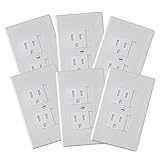 Self-Closing Outlet Covers, 6 Pack
Slide shut on their own, so they still work on the day someone forgets to put the plug back.
Check price on Amazon → Roving Cove Corner and Edge Protector
Coffee-table corners sit at exactly head height for a child learning to walk.
Check price on Amazon →As an Amazon Associate we earn from qualifying purchases, at no extra cost to you.